Remote teams don’t train themselves. Without an office hallway to pick up habits through proximity, every skill has to be taught on purpose. Gallup research shows that employees with clear expectations at work are 47% less likely to experience frequent burnout. A training plan is how you set those expectations for remote hires.
An employee training plan template hands managers something most of them lack: a way to build skills without reinventing the wheel each time. Document it once, and nobody’s left guessing what they should know by week four or month three.
Below are 10 remote employee training plan template examples. Purpose, steps, customization tips, and a ready-to-use image template for each one.
10 Remote Employee Training Plan Template Examples
Every employee training plan template below uses the same layout: purpose, why it matters, key steps, and how to customize. Think of each as an employee training plan sample you can adapt. Looking for a sample employee training plan for a specific role? Grab the one that fits and change the details.
New Hire Onboarding Plan Template
Purpose
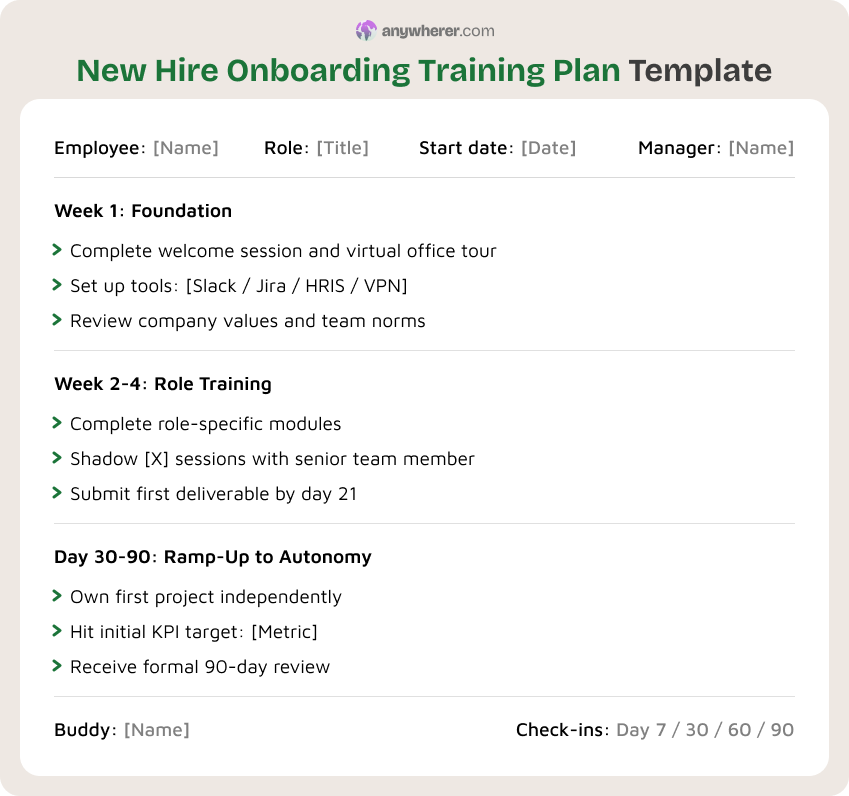
Give remote new hires a structured first 90 days covering culture, tool setup, role-specific training, and performance expectations. This is the most common new employee training plan template.
Why it matters
A rough first week takes months to undo. BambooHR found that people who rate their onboarding highly are 18 times more committed to their employer. That’s a number worth paying attention to. For a comprehensive employee training plan checklist, this one’s the starting point.
Key steps
- Step 1. Before day one, send a welcome packet: login credentials, first-week schedule, and a quick team intro.
- Step 2. Day one itself? Walk them through Slack, your project management tool, and whatever role-specific software they’ll touch daily.
- Step 3. Then load up role-specific material. Sales gets product demos. Engineering gets codebase walkthroughs. Support gets ticket simulations.
- Step 4. Check in on day 7, 30, 60, and 90. Don’t skip the early ones.
How to customize
For tech companies, add a deep-dive into your development lifecycle during week one. For customer-facing roles, front-load product knowledge and escalation workflows.
Remote Leadership Training Plan Template
Purpose
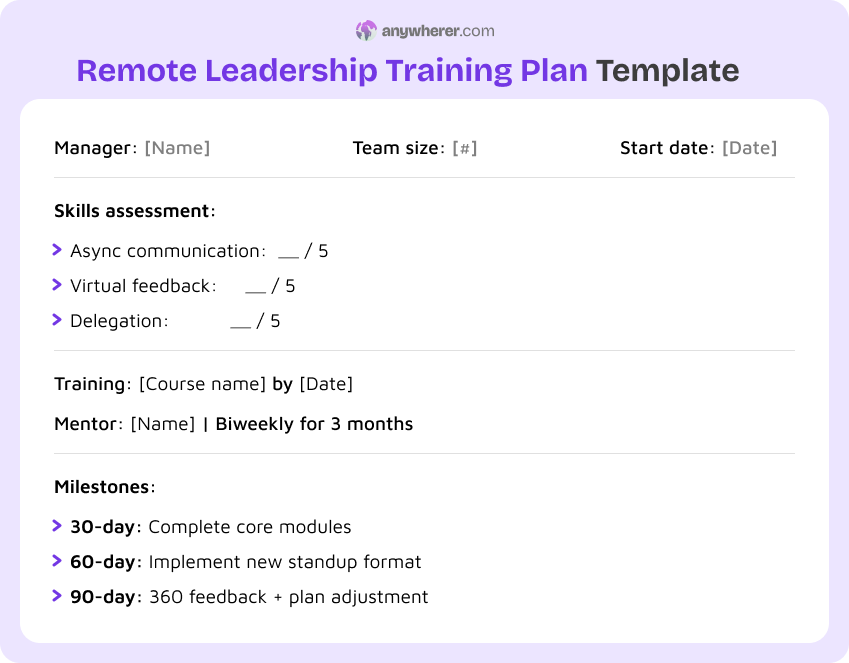
Prepare managers to lead distributed teams. This individual employee training plan template targets the gaps most first-time remote leaders face: async communication, virtual one-on-ones, accountability without micromanagement.
Why it matters
A bad remote manager can hollow out a team in three months. They either hover over every task or vanish entirely. Training them first saves you the attrition bill.
Key steps
- Step 1. Look at how the manager currently handles communication and delegation. Where are the two or three biggest gaps?
- Step 2. Enroll them in a virtual leadership course that covers standups, async decisions, and remote performance conversations.
- Step 3. Pair them with someone who’s already led a remote team successfully. Biweekly sessions, three months minimum.
- Step 4. At the 90-day mark, run a 360 feedback round. Use what comes back to adjust the rest of the plan.
How to customize
For inherited teams, start with 15-minute one-on-ones before training begins. For first-time managers, add a written-feedback module.
Sales Team Training Plan Template
Purpose
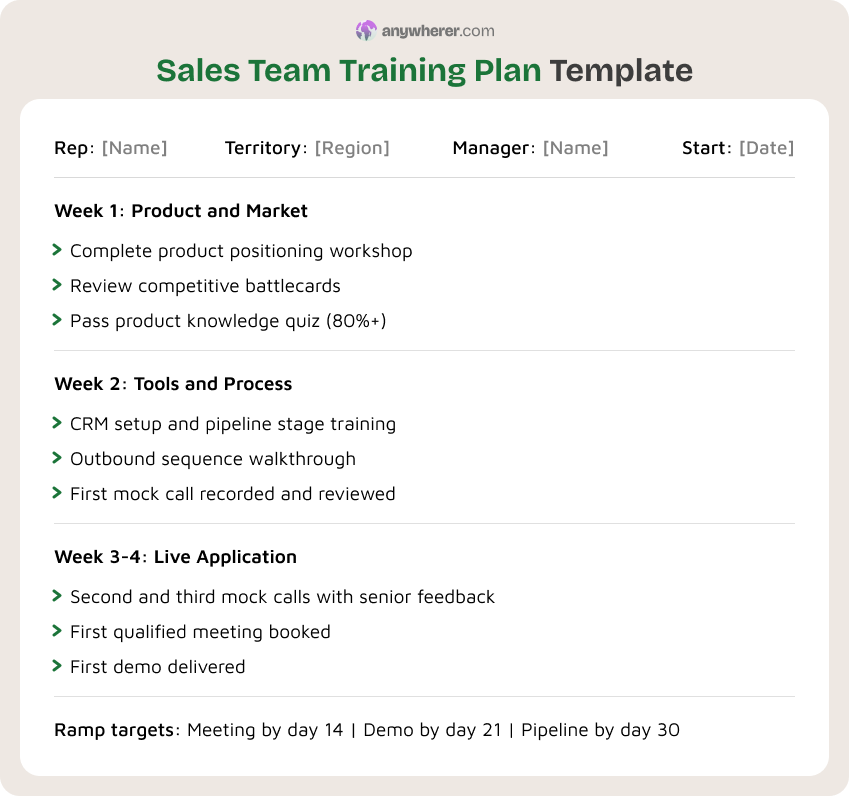
Ramp remote sales reps to quota-readiness covering product knowledge, CRM proficiency, objection handling, and pipeline management. This employee training plan example focuses on revenue impact.
Why it matters
An untrained rep is an expensive experiment. Every week they spend guessing the cost of your real pipeline. And remote sales teams can’t learn by overhearing the top closer on the next desk.
Key steps
- Step 1. Two-day product deep-dive. Not feature lists, but positioning, differentiators, the objections buyers actually raise.
- Step 2. CRM training next: pipeline stages, required fields, forecasting rules. Messy CRM data hurts everyone.
- Step 3. Three recorded mock calls over weeks two and three. A senior rep reviews each one.
- Step 4. Ramp targets: first meeting by day 14, first demo by day 21, first pipeline entry by day 30.
How to customize
For enterprise sales, extend the ramp to 60 days and add a deal strategy workshop. For SDR/BDR roles, shorten to 21 days and focus on outbound sequences.
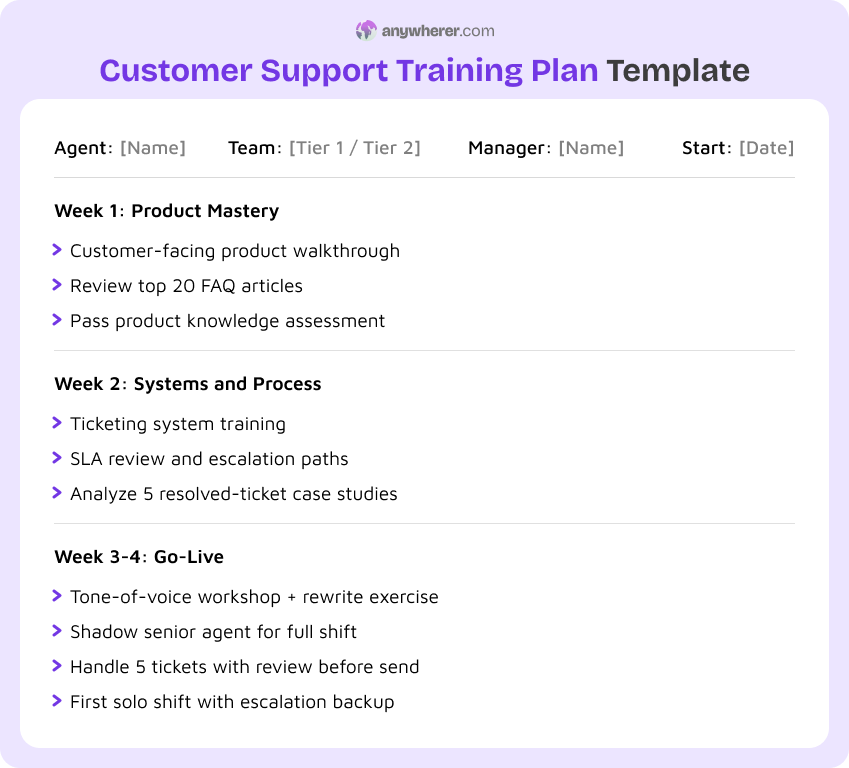
Customer Support Training Plan Template
Purpose
Get remote support agents handling tickets confidently: product knowledge, ticketing workflows, escalation paths, and the right tone of voice for working solo without a supervisor over their shoulder.
Why it matters
One sloppy support reply can undo months of marketing effort. This training plan for new employee templates gets agents sharp from day one.
Key steps
- Step 1. Product walkthrough from the customer’s angle: signup, daily workflows, spots where people get stuck.
- Step 2. Ticketing deep-dive: categories, SLAs, escalation triggers. Throw in five real case studies.
- Step 3. Tone-of-voice workshop. Have agents rewrite three bad customer responses until the wording’s right.
- Step 4. Shadow a senior agent, then handle five tickets yourself with review before send.
How to customize
For SaaS teams, add a troubleshooting lab in a sandbox environment. For e-commerce, focus on return policies and payment disputes.
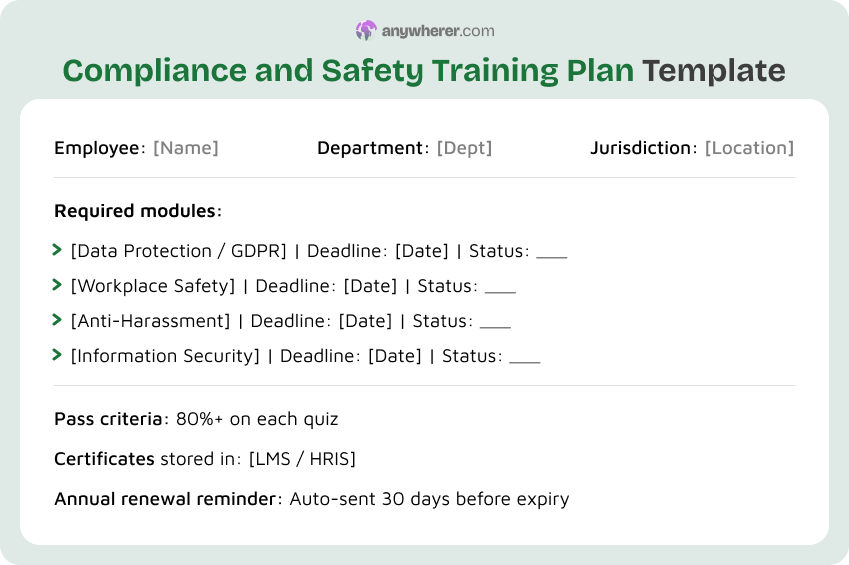
Compliance and Safety Training Plan Template
Purpose
Make sure every remote employee completes mandatory regulatory, safety, and data-protection training on time.
Why it matters
Nobody notices a compliance gap until the audit hits or the breach happens. A sample new employee training plan for compliance plugs that hole with hard deadlines and automated nudges.
Key steps
- Step 1. Figure out what’s mandatory for each role, department, and jurisdiction. Write it down.
- Step 2. Push modules through the LMS with hard deadlines. No “get to it whenever” options.
- Step 3. End each module with a quiz. Pass or retake, that’s it.
- Step 4. Store certs centrally and set auto-reminders for annual renewal.
How to customize
Healthcare and finance teams need scenario-based training, not just slide decks. For multinational teams, localize content for each jurisdiction.
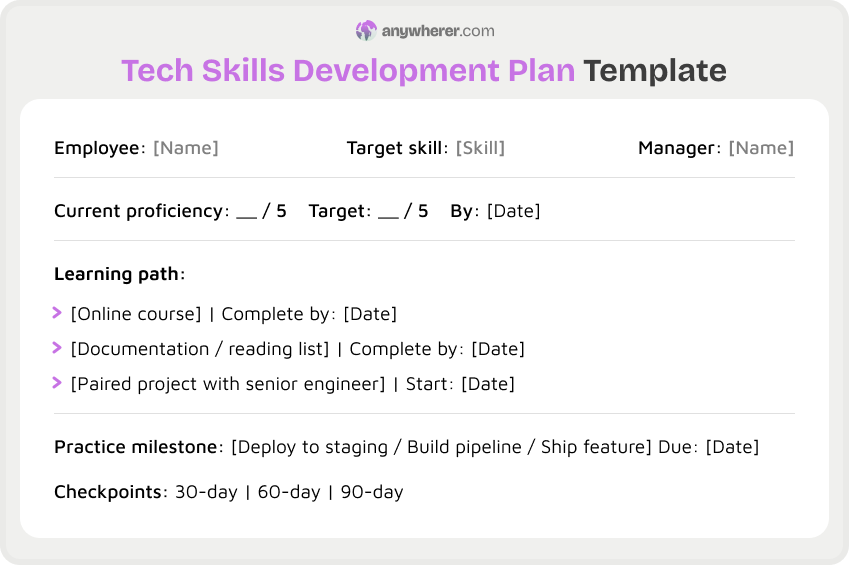
Tech Skills Development Plan Template
Purpose
Close technical skill gaps for developers, data engineers, or IT staff. This employee cross training plan template works for upskilling or cross-training into an adjacent discipline.
Why it matters
Tech skills don’t age well. What your engineer knew at hiring might be irrelevant 18 months down the line. Keep an eye on skill growth alongside examples of performance appraisal so you can see whether training actually moves the needle on output.
Key steps
- Step 1. Pin down the target skill. Have the employee rate themselves 1-5, then get the manager’s take.
- Step 2. Build a learning path: course, docs, and a paired project with a senior engineer.
- Step 3. Set a real milestone. Not “read about it” but “deploy to staging by day 30.”
- Step 4. Check in at 30, 60, 90 days. Re-score proficiency each time.
How to customize
For data teams, replace the project milestone with a working pipeline or model. For IT ops, focus on incident response simulations.
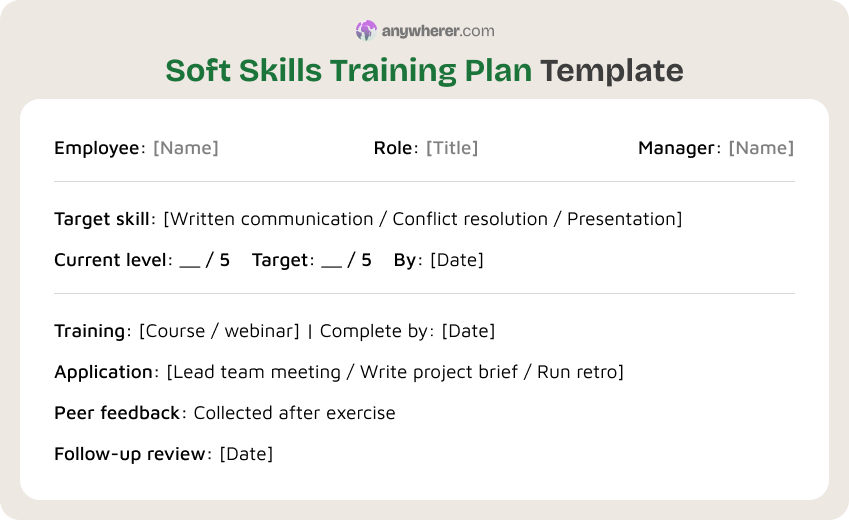
Soft Skills Training Plan Template
Purpose
Develop communication, collaboration, and conflict-resolution skills for remote employees where written communication carries most of the daily interaction.
Why it matters
Soft skill gaps show up as friction: misunderstood messages, meetings that go in circles, or teammates who avoid direct feedback.
Key steps
- Step 1. What specifically is the gap? Get the answer from the manager, or from the person themselves. “Write clearer status updates” works. “Be better at communicating” doesn’t.
- Step 2. One short course or webinar. Under four hours. Anything longer and completion drops off a cliff.
- Step 3. Then a real application: run the next standup, write the project brief, lead the retro.
- Step 4. Peer feedback after the exercise. Did it actually land?
How to customize
For client-facing roles, focus on presentation skills and active listening. For engineering teams, prioritize written communication and code-review feedback. Use a sample employee training plan template to track soft skill development alongside technical growth.
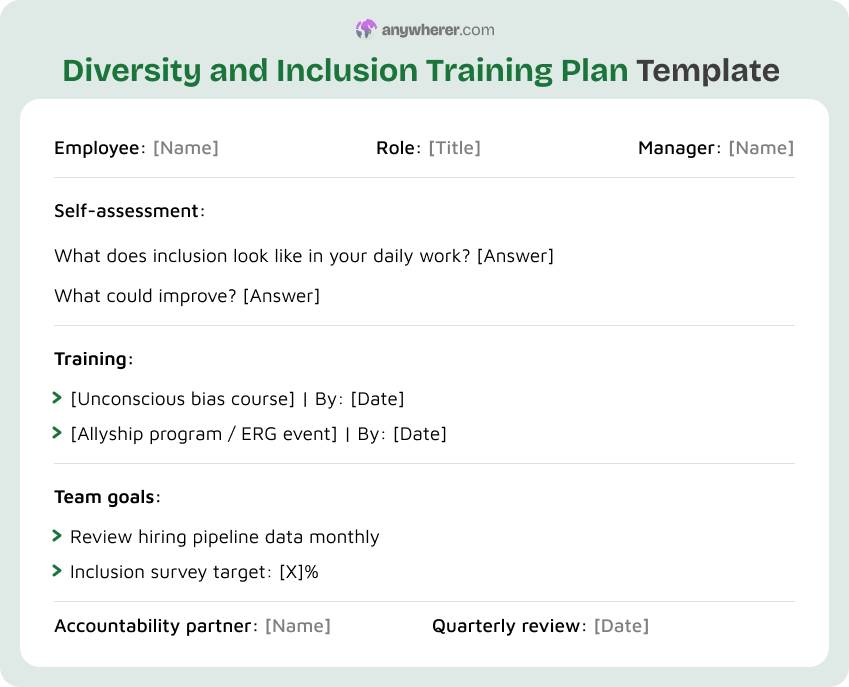
Diversity and Inclusion Training Plan Template
Purpose
Build awareness and change behavior around inclusion, bias, and equitable practices. Use this training plan for new employee template during onboarding and revisit quarterly.
Why it matters
People assume distance kills bias. It doesn’t. Proximity bias alone makes managers favor whoever they see on camera most.
Key steps
- Step 1. Self-assessment first. What does each person actually know about bias and inclusive language?
- Step 2. One core module: could be unconscious bias, allyship, or inclusive hiring. Pick what fits.
- Step 3. Team-level goals backed by data. Review the hiring pipeline monthly. Track who speaks in meetings.
- Step 4. Pair each person with an accountability partner or ERG. Quarterly review with real numbers.
How to customize
For managers, add a section on equitable performance reviews and promotion decisions. For hiring teams, focus on structured interviewing and bias-resilient scoring rubrics.
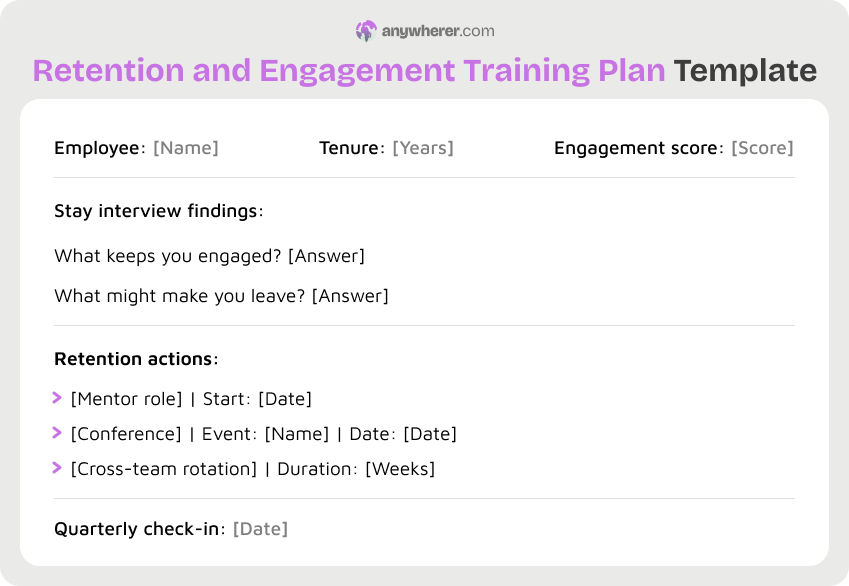
Remote Employee Retention and Engagement Plan Template
Purpose
Keep experienced remote employees engaged by tying training to career growth, not just compliance.
Why it matters
It’s always cheaper to develop someone than to replace them. A comprehensive list employee training plan details should weave retention-focused training alongside onboarding and skills tracks. Pair it with solid employee training solutions and the experience runs itself.
Key steps
- Step 1. Start with a stay interview. What keeps this person here? What might push them out?
- Step 2. Find a stretch goal: mentoring, a conference, a cross-team project, or a deep-dive into a new technology.
- Step 3. Write it down. Actions, timelines, quarterly check-in date.
- Step 4. Revisit every quarter. The thing that excited them in January might bore them by July.
How to customize
For senior ICs, offer a technical leadership track. For operations staff, rotate into a process improvement initiative. New employee training plan examples focus on getting people started. Retention plans focus on keeping them interested.
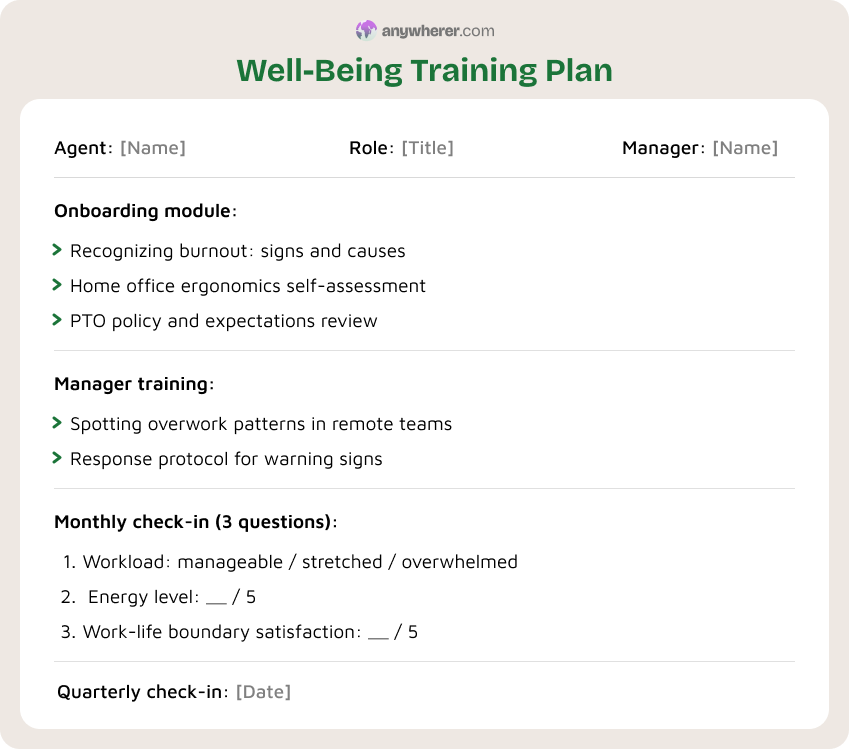
Well-Being Training Plan Template
Purpose
Address burnout, ergonomic risks, and the always-on culture of remote work. This plan teaches employees and managers to spot burnout signals and build sustainable habits.
Why it matters
Remote workers often struggle with the always-on expectation. No commute means no natural boundary between work and everything else. Burnout builds quietly and shows up as declining quality or sudden resignations.
Key steps
- Step 1. Teach the warning signs of burnout: constant tiredness, cynicism, dropping output. Don’t save this for later, cover it at onboarding.
- Step 2. Hand out an ergonomics self-assessment and a stipend for home office gear.
- Step 3. Train managers separately. Late-night Slack messages and skipped PTO aren’t dedication signals, they’re red flags.
- Step 4. Monthly well-being check-in. Three questions: workload, energy, boundary satisfaction.
How to customize
For high-pressure roles, add stress management. For engineering, focus on on-call fairness. Any free employee training plan template should include a well-being component.
Challenges of Remote Employee Training and How to Overcome Them
Every remote training program hits the same walls. Here’s what to watch for.
- Time zone gaps. When your team stretches across eight or more time zones, live sessions won’t work for everyone. Record everything. Swap real-time Q&A for async discussion boards.
- Disengagement. Nobody stays engaged through two hours of video. Chop training into 20-minute chunks. Drop in polls or quizzes to keep people present.
- Technical barriers. Weak internet, old laptops, unfamiliar tools – all of it derails a session. Test setups ahead of time. Always have a backup plan.
- No feedback loop. If nobody tells employees what changed after they gave feedback, they’ll stop caring. Close the loop every time.
Tips for Maximizing the Effectiveness of Remote Training Plans
The plans that actually work share a handful of habits.
- Set clear KPIs. Pick one or two measurable outcomes per plan. “Complete training” isn’t a KPI. “Cut average ticket resolution by 15% in 60 days” is. A training plan template for new employee programs should measure success in numbers, not checkboxes.
- Use microlearning. 10 to 20-minute modules people can squeeze between meetings. On-demand libraries let employees revisit material when they actually need it, not just during week one.
- Build in collaboration. Group projects, peer reviews, discussion threads. People remember conversations more than videos. Work at least one collaborative piece into every plan.
- Review and update. Look at the numbers every quarter. A module with 40% completion is a bad module, not lazy employees. A new employee training plan template free of stale content beats a polished one nobody finishes.
FAQs on Remote Employee Training Plan Template Examples
How do I measure the effectiveness of remote employee training?
Completion rates and quiz scores are the starting point. Time-to-competency tells you speed. But the real test is the business metric: did ticket times go down? Did the sales ramp shrink? If a number moved, the training worked. If nothing changed, it’s overhead.
What are common mistakes to avoid when implementing remote employee training?
Using the same plan for every role. Ignoring the feedback loop. Making sessions too long. Fix those three and you’re ahead of most companies. Keep plans role-specific, ask for input after every cycle, and don’t go past 20 minutes per session.
How do I handle technical issues during remote training sessions?
Test everything before go-time. Have a backup platform queued up. Record every live session automatically: a dropped connection shouldn’t mean missed content.
How often should I update remote employee training materials?
Every six months at minimum. Quarterly if your team moves fast. If a module’s sitting at under 60% completion or below a 3 out of 5 satisfaction score, don’t tweak it but rewrite it.
How can I make remote training more interactive?
Live polls help. So do breakout rooms and quizzes dropped between sections. Ditch the passive slide deck where you can. Hands-on work, such as simulated tickets, mock sales calls, paired coding, sticks better than anything someone watched on mute.
Conclusion
Remote employee training works when it’s structured, specific, and tied to something you can actually measure. The 10 employee training plan templates above cover the scenarios most teams face. Grab the ones that match your situation, change the details, and keep improving them every cycle.

Yaryna is our lead writer with over 8 years of experience in crafting clear, compelling, and insightful content. Specializing in global employment and EOR solutions, she simplifies complex concepts to help businesses expand their remote teams with confidence. With a strong background working alongside diverse product and software teams, Yaryna brings a tech-savvy perspective to her writing, delivering both in-depth analysis and valuable insights.